Background
ShellBags were introduced in Microsoft Windows to provide a consistent and personalized interface to users when interacting with directories through the Windows Explorer application. This includes, but is not limited to:
- Icon size, position, view mode (e.g., list, details, tiles).
- Window size, and location.
- Recording information for local drives, network shares, and removable devices.
ShellBags are a well-known and well-documented registry-based forensic artifact that is highly valuable in forensic analysis, as they allow investigators to determine which directories a user accessed via Windows Explorer and when. Another key advantage of ShellBags is that they retain data for accessed directories even after those directories have been deleted from the file system.
In this post, I want to explore if there are any specifics in how Windows 11 records ShellBags for common user operations within Windows Explorer, with a specific focus on timestamps that indicate user interactions with directories, i.e. “FirstInteracted” and “LastInteracted” fields.
Limitations
- The experiments were performed on Windows 11 Pro, version 24H2, OS build 26100.3194.
- There were no ShellBag entries for any of the directories covered in the experiments prior to me beginning the tests.
Executive summary
ShellBags entries were updated only when the user actively navigated to a directory in Windows Explorer. Edge cases, such as directory creation via the command line, copying or moving directories and files, or merely clicking on directories, did not trigger ShellBag updates.
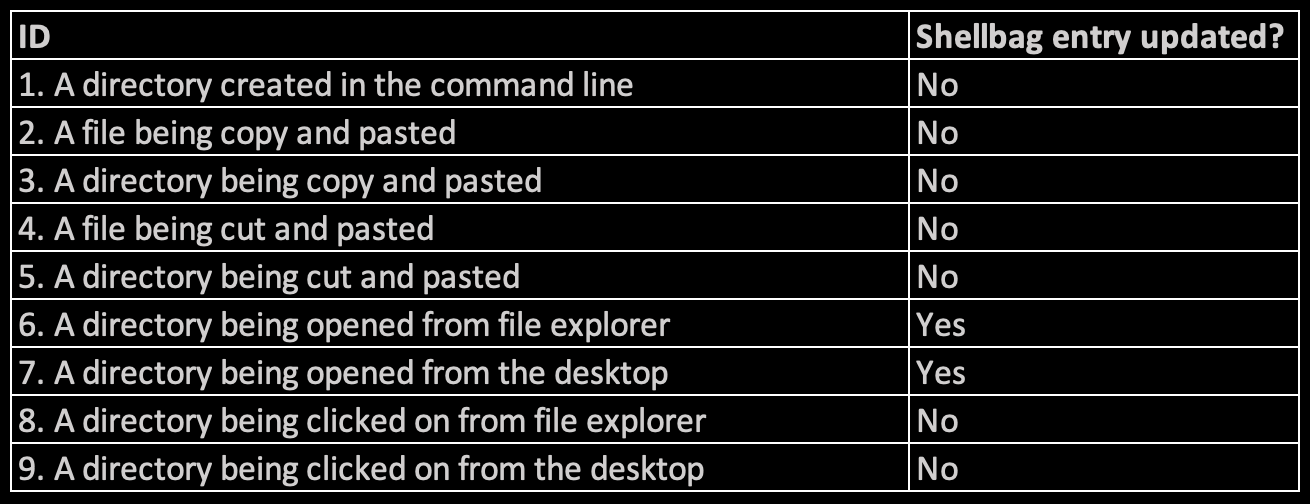
Figure 1 - analysis summary
Please refer to the section “Experiments” for the detailed documentation on the performed tests and results.
Experiments
I performed a series of tests covering some common operations users perform on a daily basis:
- Test #1: A directory created in the command line.
- Test #2: A file being copy and pasted.
- Test #3: A directory being copy and pasted.
- Test #4: A file being cut and pasted.
- Test #5: A directory being cut and pasted.
- Test #6: A directory being opened from file explorer.
- Test #7: A directory being opened from the desktop.
- Test #8: A directory being clicked on from file explorer.
- Test #9: A directory being clicked on from the desktop.
Test #1
The main investigative question I want to answer with this experiment - in an event of a directory created in the command line, would a ShellBag entry be created for the directory?
In this test I leveraged “mkdir” command to create a directory “C:_Data\Tests\01_dir_created_in_cmd_line\”. I manually recorded the following time stamp when the directory was created “2025-02-15T00:50:24Z”. There was no ShellBag entry created for the directory “C:_Data\Tests\01_dir_created_in_cmd_line\”.
With that said, the ShellBag entry was not created in an event of a directory created in the command line.
Test #2
The main investigative question I want to answer with this experiment - in an event of file copy and paste, would a ShellBag entry be updated for the directory where the file was copied to?
In this test I leveraged Windows Explorer copy and paste functionality for the file that was copied to a directory “C:_Data\Tests\2_file_copy_paste\”. I manually recorded the following time stamps during the experiment:
- Opened the target directory: 2025-02-15T00:52:46Z
- Pasted the file: 2025-02-15T00:56:31Z
- Closed the target directory: 2025-02-15T00:59:05Z
The time stamp “2025-02-15T00:52:44Z” was recorded for the target directory, which corresponds with the time when I opened the directory (recorded within the “FirstInteracted” field of the ShellBag entry). There was no time stamp recorded within the “LastInteracted” field.
With that said, the operation of copying a file did not update the ShellBag entry for the target directory.
Test #3
The main investigative question I want to answer with this experiment - in an event of directory being copy and pasted, would ShellBag entries be updated for both the target directory and the copied directory? To answer the question, I explored two scenarios covered below. I leveraged Windows Explorer copy and paste functionality to copy test folders.
The first scenario is when a directory “3_folder_copy_paste” was copied from the desktop to a directory “C:_Data\Tests\”. I manually recorded the following time stamp when the directory was pasted: “2025-02-15T01:00:56Z”. I did not observe ShellBag entry created neither for the source directory “3_folder_copy_paste” neither located on the desktop, nor for the copied directory “C:_Data\Tests\3_folder_copy_paste\”.
The second scenario is when a directory “3.1_folder“ was copied from the desktop to “C:_Data\Tests\3.1_folder_copy_paste\”. I manually recorded the following time stamps during the experiment:
- Target directory created: 2025-02-15T01:33:33Z
- Opened the target directory: 2025-02-15T01:35:20Z
- Pasted the directory: 2025-02-15T01:37:46Z
- Closed the target directory: 2025-02-15T01:38:47Z
The time stamp “2025-02-15T01:35:20Z” was recorded for the target directory “C:_Data\Tests\3.1_folder_copy_paste\”, which corresponds with the time when I opened the directory (recorded within the “FirstInteracted” field of the ShellBag entry). There was no time stamp recorded within the “LastInteracted” field.
With that said, the operation of copying a directory did not update ShellBag entries neither for the directory that was copied nor for the target directory where directory was copied to.
Test #4
The main investigative question I want to answer with this experiment - in an event of file being cut and pasted, would a ShellBag entry be updated for the directory where the file was pasted to?
In this test I leveraged Windows Explorer cut and paste functionality for the file that was moved to a directory “C:_Data\Tests\4_file_cut_paste\”. I manually recorded the following time stamps during the experiment:
- Opened the target directory: 2025-02-15T01:03:30Z
- Pasted the file: 2025-02-15T01:04:47Z
- Closed the target directory: 2025-02-15T01:06:31Z
The time stamp “2025-02-15T01:03:30Z” was recorded for the target directory “C:_Data\Tests\4_file_cut_paste\”, which corresponds with the time when I opened the directory (recorded within the “FirstInteracted” field of the ShellBag entry). There was no time stamp recorded within the “LastInteracted” field.
With that said, the operation of moving a file did not update the ShellBag entry for the directory where the file was pasted to.
Test #5
The main investigative question I want to answer with this experiment - in an event of directory being cut and pasted, would ShellBag entries be updated for both the target directory and the moved directory? To answer the question, I explored two scenarios covered below. I leveraged Windows Explorer cut and paste functionality to move test folders.
The first scenario is when a directory “5_folder_cut_paste” was copied from the desktop to a directory “C:_Data\Tests\”. I manually recorded the following time stamp when the directory was pasted: “2025-02-15T01:11:46Z”. I did not observe ShellBag entry created neither for the source directory “5_folder_cut_paste” neither located on the desktop, nor for the target directory “C:_Data\Tests\5_folder_cut_paste\”.
The second scenario is when a directory “5.1_folder“ was copied from the desktop to “C:_Data\Tests\5.1_folder_cut_paste\”. I manually recorded the following time stamps during the experiment:
- Target directory created: 2025-02-15T01:40:23Z
- Opened the target directory: 2025-02-15T01:41:40Z
- Pasted the directory: 2025-02-15T01:43:03Z
- Closed the target directory: 2025-02-15T01:44:01Z
The time stamp “2025-02-15T01:41:40Z” was recorded for the target directory “C:_Data\Tests\5.1_folder_cut_paste\”, which corresponds with the time when I opened the directory (recorded within the “FirstInteracted” field of the ShellBag entry). “LastInteracted” ShellBag field also recorded the same time stamp - “2025-02-15T01:41:40Z”.
With that said, the operation of moving a directory via cut and paste did not update ShellBag entries neither for the directory that was copied nor for the target directory where directory was copied to.
Test #6
The main investigative question I want to answer with this experiment - in an event of directory being opened via Windows Explorer from a non-desktop location, would a ShellBag entry be updated for the directory?
In this test I leveraged Windows Explorer double click operation to open the target directory “C:_Data\Tests\6_dir_opened_from_file_explorer\”. I manually recorded the following time stamps during the experiment:
- Opened the target directory: 2025-02-15T01:13:16Z
- Closed the target directory: 2025-02-15T01:15:14Z
The time stamp “2025-02-15T01:13:16Z” was recorded for the target directory “C:_Data\Tests\6_dir_opened_from_file_explorer\”, which corresponds with the time when I opened the directory (recorded within the “FirstInteracted” field of the ShellBag entry). There was no time stamp recorded within the “LastInteracted” field.
With that said, the operation of opening a directory via Windows Explorer from a non-Desktop location does update the ShellBag entry. This behavior is expected and was present in prior versions of Windows.
Test #7
The main investigative question I want to answer with this experiment - in an event of directory opened from the Desktop, would ShellBag entries be updated for the directory?
In this test I leveraged Windows Explorer double click operation to open the target directory “%USERPROFILE%\Desktop\7_dir_opened_from_desktop\”. I manually recorded the following time stamps during the experiment:
- Opened the target directory: 2025-02-15T01:22:10Z
- Closed the target directory: 2025-02-15T01:24:42Z
The time stamp “2025-02-15T01:22:10Z” was recorded for the target directory “%USERPROFILE%\Desktop\7_dir_opened_from_desktop\”, which corresponds with the time when I opened the directory (recorded within the “FirstInteracted” field of the ShellBag entry). There was no time stamp recorded within the “LastInteracted” field. Interestingly enough, the flag “HasExplored” was set to FALSE in the ShellBag entry.
With that said, the operation of opening a directory via Windows Explorer from a Desktop location does update the ShellBag entry. This behavior is expected and was present in prior versions of Windows. However, “HasExplored” was set to FALSE.
Test #8
The main investigative question I want to answer with this experiment - in an event of directory being clicked on (one time click to select the directory, without navigating to the directory) within Windows Explorer from a non-desktop location, would ShellBag entries be updated for the directory?
In this test I leveraged Windows Explorer single click operation to select the target directory “C:_Data\Tests\8_dir_clicked_from_file_explorer”. I manually recorded the following time stamps during the experiment:
- Clicked the target directory: 2025-02-15T01:26:55Z
- Un-clicked the target directory: 2025-02-15T01:28:05Z
ShellBag entry for “C:_Data\Tests\8_dir_clicked_from_file_explorer\” was not created.
With that said, the operation of single click on a directory within Windows Explorer from a non-desktop location, did not update the ShellBag entry for the target directory will not be updated.
Test #9
The main investigative question I want to answer with this experiment - in an event of directory being clicked on (one time click to select the directory, without navigating to the directory) within Windows Explorer from the Desktop location, would ShellBag entries be updated for the directory?
In this test I leveraged Windows Explorer single click operation to select the target directory “%USERPROFILE%\Desktop\9_dir_clicked_from_desktop\”. I manually recorded the following time stamps during the experiment:
- Clicked the target directory: 2025-02-15T01:30:27Z
- Un-clicked the target directory: 2025-02-15T01:31:25Z
ShellBag entry for “%USERPROFILE%\Desktop\9_dir_clicked_from_desktop\” was not created.
With that said, the operation of single click on a directory within Windows Explorer from the Desktop location, did not update the ShellBag entry for the target directory will not be updated.
References
- The theme for this post was inspired by David Cowen’s Sunday Funday challenge! (https://www.hecfblog.com/2025/02/daily-blog-744-sunday-funday-2925.html)
- “Windows ShellBag Forensics in Depth” by Vincent Lo (https://www.giac.org/paper/gcfa/9576/windows-shellbag-forensics-in-depth/128522)
Tools used
- ShellBags Explorer and SBECmd by Eric Zimmerman (https://ericzimmerman.github.io/#!index.md)